
YouTube to MP3 Downloader – Convert YouTube Videos to MP3 with YTMP4
Looking for a simple way to download YouTube audio in MP3 format? YTMP4 YouTube to MP3 Downloader provides an easy-to-use online interface for converting supported YouTube videos into downloadable audio files. Whether you need an original recording, educational lecture, podcast, or other content you have permission to save, YTMP4 helps you access available MP3 download options without installing additional software.
The process is straightforward. Copy a YouTube video link, paste it into the downloader, click Fetch Video, and review the available formats. Select an MP3 option, prepare your download link, and save the audio file to your device. YTMP4 also supports MP4 video downloads, making it convenient to choose between audio-only and video formats from the same downloader.
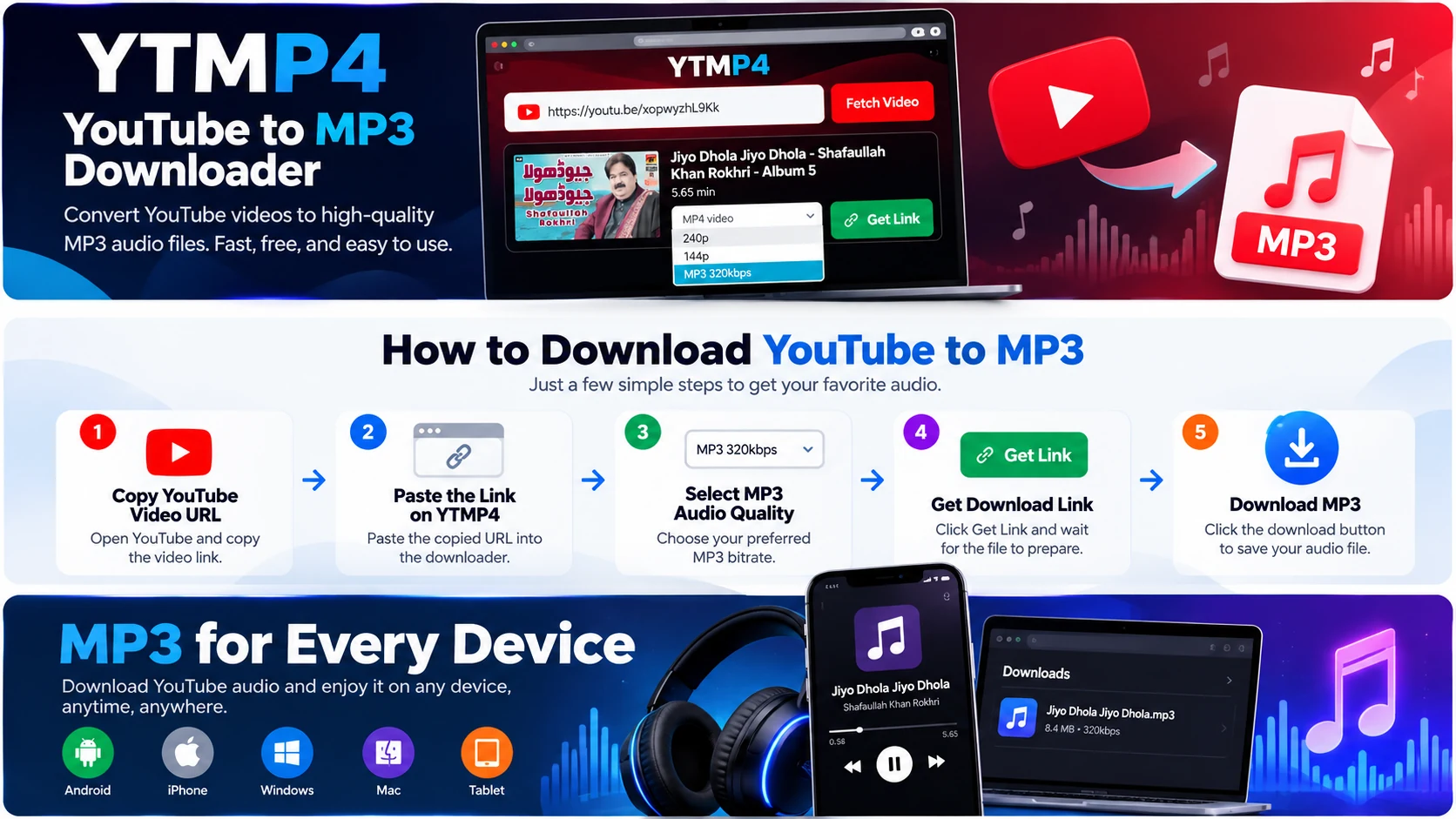
How to Convert YouTube to MP3 Using YTMP4
You do not need technical experience to use the YTMP4 YouTube MP3 downloader. Follow these six steps.
Step 1: Find Your YouTube Video
Open YouTube and locate the video containing the audio you want to save. Make sure you own the content or have permission to download it.
Step 2: Copy the Video URL
Click the Share button and select Copy Link. On a computer, you can also copy the video address directly from the browser's address bar.
Step 3: Open YTMP4
Visit the YTMP4 website using a compatible browser. The homepage includes a downloader field where you can enter your YouTube URL.
Step 4: Paste the Link and Fetch Video
Paste the copied URL into the input box and click Fetch Video. The downloader will attempt to retrieve the video's title, thumbnail, duration, and available formats.
Step 5: Select MP3 Audio Quality
Open the quality dropdown and choose an available MP3 option. The bitrate choices depend on the video and conversion provider.
Step 6: Download Your MP3 File
Click Get Link and wait for the audio download to be prepared. Once the download button appears, select it to save the file.
The time required may vary according to the source video, provider response, and internet connection.
Why Choose YTMP4 for YouTube to MP3 Downloads?
Simple and Clear Interface
YTMP4 keeps the main controls in one place. Users can paste a link, fetch media information, choose a format, and request a download without navigating several conversion screens.
MP3 and MP4 Support
One useful feature of YTMP4 is its combined format selection. Users can choose MP3 for audio-only playback or MP4 when they need the original video content.
No Separate Software Required
The downloader works through a compatible web browser. There is no need to install a desktop conversion application for the standard workflow.
Video Preview Before Downloading
YTMP4 displays the video title and thumbnail when this information is available. This helps users verify that they have submitted the correct video link.
Available Audio Quality Options
The downloader displays supported audio bitrates returned by its provider. Users can select an appropriate option based on their listening needs and available storage.
Compatible With Multiple Devices
YTMP4 can be accessed from Android phones, iPhones, Windows computers, Macs, and tablets. File-saving behavior depends on the device and browser.
Understanding YouTube to MP3 Audio Quality
Audio quality is an important consideration when choosing an MP3 download. Bitrate describes the amount of data used to encode audio per second and is commonly measured in kilobits per second (kbps). Higher bitrates generally require more storage space and can preserve more audio detail during encoding. However, the quality of the original recording remains a major factor.
Common MP3 Bitrates
| MP3 Bitrate | Typical Use |
|---|---|
| 64kbps | Speech and basic voice recordings |
| 96kbps | Spoken educational content |
| 128kbps | Everyday listening |
| 192kbps | Balanced audio quality and file size |
| 256kbps | Higher-bitrate audio playback |
| 320kbps | High-bitrate MP3 encoding |
Does 320kbps Always Mean Better Sound?
Not necessarily. A 320kbps MP3 cannot restore audio information that was missing from the original recording. Re-encoding a low-quality source at a higher bitrate may increase file size without producing a noticeable improvement. For everyday listening, the best option is usually a supported bitrate that balances sound quality and storage requirements.
Download YouTube MP3 on Different Devices
YouTube to MP3 on Android
Open YTMP4 using Chrome or another compatible Android browser. Paste your YouTube URL, fetch the available formats, and select MP3.
Once the download is complete, the audio file can usually be found in your Downloads folder or file manager.
YouTube to MP3 on iPhone
Use Safari or another supported browser to access YTMP4. Submit the video link and select an available audio download.
Depending on your browser settings, the saved MP3 file may appear in the Files app under Downloads.
YouTube to MP3 on Windows
Open the downloader in Chrome, Edge, Firefox, or another compatible browser. After downloading the MP3 file, locate it in your selected download folder.
You can play it using a compatible audio application.
YouTube to MP3 on Mac
Mac users can access YTMP4 through Safari, Chrome, or another modern browser. Downloaded MP3 files can be managed through Finder and played using compatible applications.
Benefits of Downloading Audio in MP3 Format
Convenient Offline Listening
Successfully downloaded MP3 files can be played without an internet connection. This is useful for recordings you are authorized to keep and access offline.
Smaller File Sizes
MP3 files generally require less storage than video files containing the same audio, making them convenient for portable devices.
Wide Device Compatibility
MP3 is supported by numerous audio players, smartphones, computers, car entertainment systems, and other playback devices.
Easy File Organization
You can organize permitted audio recordings into folders based on topics, speakers, projects, or personal collections.
Useful for Educational Content
Audio-only copies of lectures, language lessons, interviews, and presentations can be convenient when the content owner permits downloading.
YouTube to MP3 vs YouTube to MP4
Although both formats are useful, they serve different purposes.
| Feature | MP3 | MP4 |
|---|---|---|
| Media type | Audio | Video and audio |
| Best for | Listening | Watching |
| Video playback | No | Yes |
| Quality selection | Audio bitrate | Video resolution |
| Typical storage needs | Lower | Higher |
| Common use | Podcasts and voice recordings | Tutorials and demonstrations |
Choose MP3 when the audio is sufficient. Choose MP4 when you need visual information such as demonstrations, diagrams, or on-screen instructions.
YTMP4 makes this choice convenient by presenting supported formats through its downloader interface.
Tips for a Smooth YouTube MP3 Download
A few practical habits can improve your experience.
-
Use a valid video link: Copy the URL directly from YouTube's Share menu.
-
Check the video information: Confirm the title and thumbnail before selecting a format.
-
Choose an available bitrate: Not every video offers the same audio quality.
-
Keep your browser updated: Modern browsers generally provide better compatibility.
-
Check your Downloads folder: File locations depend on your browser settings.
-
Respect content rights: Download only recordings you own or are permitted to save.
If a video cannot be processed, it may be private, restricted, removed, unsupported, or temporarily unavailable through the conversion provider.
Frequently Asked Questions
1. What is YTMP4 YouTube to MP3 Downloader?
YTMP4 is an online downloader interface that lets users request MP3 audio files from supported YouTube videos.
2. Is YTMP4 free to use?
YTMP4 provides a free-to-access downloader interface without requiring a separate website subscription for the standard process.
3. How do I convert a YouTube video to MP3?
Copy a supported YouTube video URL, paste it into YTMP4, click Fetch Video, select an available MP3 option, and request the download link.
4. Can I download YouTube MP3 at 320kbps?
A 320kbps option may be available when supported by the provider. It is not guaranteed for every video.
5. Do I need to install an MP3 converter?
No. YTMP4 operates through a compatible web browser without requiring separate conversion software.
6. Does YTMP4 work on Android?
Yes. The website can be accessed through compatible Android browsers.
7. Can I use YTMP4 on an iPhone?
Yes. You can access the downloader through a compatible iPhone browser. Saved files may appear in the Files app.
8. Can I download MP4 videos as well?
Yes. YTMP4 also supports available MP4 video formats through its downloader.
9. Why is my MP3 download not working?
Possible causes include an unsupported video, unavailable audio format, expired download link, or temporary provider issue.
10. Where are downloaded MP3 files saved?
Most browsers save files to a configured Downloads folder. The exact location varies by device and browser.
11. Does converting to MP3 improve audio quality?
No. MP3 conversion cannot restore sound details missing from the original source.
12. Is downloading YouTube audio legal?
Downloading depends on copyright permissions, applicable laws, and YouTube's terms. Only save audio that you own or have authorization to download.
Conclusion
YTMP4 YouTube to MP3 Downloader offers a straightforward way to request audio downloads from supported YouTube videos. Its browser-based interface, video information preview, and combined MP3 and MP4 format selection make the process easy to understand. Whether you need an MP3 file for authorized offline listening or an MP4 file for video playback, YTMP4 helps you review available formats and prepare downloads from one convenient place.